
Introduction
YouTube is not just a video-sharing platform anymore — it’s the second-largest search engine in the world, processing over 3 billion searches monthly. Google Ads for YouTube: Complete Advertising 2025 With over 2.7 billion monthly users (Statista, 2025), YouTube has become a goldmine for brands aiming to capture attention through engaging video ads.
That’s where Google Ads for YouTube steps in — a powerful tool that allows businesses to reach their ideal audience through precisely targeted video campaigns. Whether you’re promoting a new product, building brand awareness, or driving website traffic, YouTube ads can be one of the most cost-effective digital marketing strategies when executed correctly.
In this three-part guide, we’ll explore how Google Ads work for YouTube, the different ad formats, targeting options, and pro strategies to get the best ROI.
What Is Google Ads for YouTube?
Google Ads for YouTube is an advertising feature within Google’s marketing platform that lets you promote videos on YouTube and across Google’s video partner network. These ads can appear before, during, or after videos, and even within YouTube search results or the homepage.
Essentially, advertisers bid for visibility — paying only when viewers engage (like clicking or watching past a certain duration). This pay-per-view or pay-per-click model makes it cost-efficient, even for small businesses.
How Google Ads Connects to YouTube
Since Google owns YouTube, the integration between both platforms is seamless. You can create and manage your YouTube campaigns directly from the Google Ads dashboard, linking your YouTube channel for analytics and performance tracking.
This allows advertisers to:
- Target audiences using Google’s vast data (demographics, behavior, interests)
- Track conversions (website visits, sign-ups, purchases)
- Optimize campaigns automatically with AI-driven recommendations
Why Use Google Ads for YouTube?
Here are a few reasons why businesses in 2025 are heavily investing in YouTube advertising:
- Massive Reach: YouTube reaches 95% of all online adults globally.
- Visual Storytelling: Videos engage emotions, build trust, and increase recall.
- Cost-Effective: Ads can start as low as ₹100/day (or $1/day) with flexible bidding.
- Advanced Targeting: Google Ads allows micro-targeting using location, interests, and device.
- Measurable Results: Real-time analytics lets you track views, CTR, conversions, and more.
Types of YouTube Ads
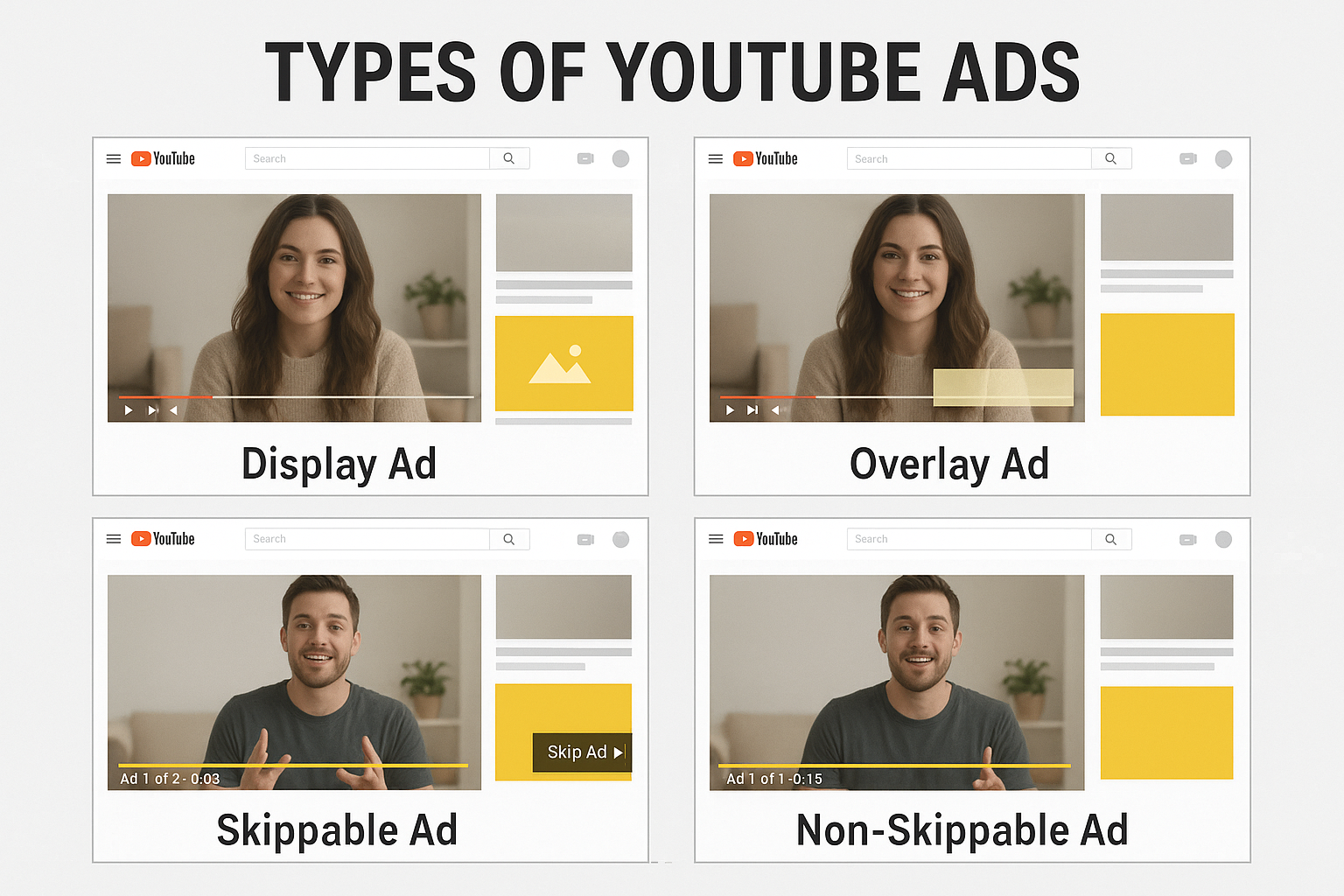
To succeed, you must understand the different ad formats available through Google Ads for YouTube. Each serves unique marketing goals — awareness, engagement, or conversion.
1. Skippable In-Stream Ads
- Description: These play before, during, or after videos, and users can skip after 5 seconds.
- Payment Model: You pay only when a viewer watches for at least 30 seconds or interacts with your ad.
- Best For: Brand awareness and storytelling.
- Example: Coca-Cola’s “Share a Coke” campaign used skippable ads to connect emotionally with audiences globally.
Pro Tip: Hook viewers in the first 5 seconds — use bold visuals, emotion, or a powerful question.
2. Non-Skippable In-Stream Ads
- Description: These ads run for 15–20 seconds and cannot be skipped.
- Payment Model: Charged per impression (CPM – Cost Per 1000 Views).
- Best For: High-impact brand messages where attention is crucial.
- Example: Apple often uses non-skippable ads during new product launches for instant recognition.
Pro Tip: Keep it short, visually strong, and include your brand name within the first few seconds.
3. Bumper Ads
- Description: Ultra-short ads (up to 6 seconds) played before videos.
- Payment Model: CPM (cost per 1000 impressions).
- Best For: Boosting brand recall or reinforcing a campaign message.
- Example: Netflix used bumper ads to tease upcoming series launches effectively.
Pro Tip: Use bold typography and punchy visuals — no time for slow storytelling here.
4. In-Feed Video Ads (Discovery Ads)
- Description: Appear in YouTube search results, homepage feeds, or next to related videos.
- Payment Model: Pay when users click to watch.
- Best For: Driving organic discovery and engagement.
- Example: A skincare brand can appear when users search “best sunscreen for oily skin.”
Pro Tip: Write compelling thumbnails and headlines — they work like SEO titles for YouTube.
5. Masthead Ads
- Description: Premium ad placement on YouTube’s homepage banner — visible to millions daily.
- Payment Model: Flat rate or CPM (very expensive, often used by big brands).
- Best For: Major launches or rebranding campaigns.
- Example: Samsung uses masthead ads for Galaxy phone launches.
Pro Tip: Ideal for global campaigns — but requires high budgets (typically $300K+).
6. Overlay Ads
- Description: Small semi-transparent banners at the bottom of YouTube videos (desktop only).
- Best For: Promoting links, discounts, or products subtly.
Pro Tip: Keep your CTA short and direct (“Shop Now”, “Learn More”).
Choosing the Right YouTube Ad Format
Your choice should depend on your goal:
| Objective | Recommended Ad Type |
|---|---|
| Brand Awareness | Non-skippable or Bumper Ads |
| Engagement & Discovery | In-Feed Video Ads |
| Conversions & Traffic | Skippable Ads or Overlay Ads |
| Product Launch | Masthead or Non-Skippable Ads |
Real-Life Example
A small Indian fashion brand used skippable in-stream ads targeting women aged 18–30 in metro cities. With a daily budget of ₹500 and optimized video content, they achieved:
- 25,000 views in one week
- 4.5% click-through rate
- 20% boost in website traffic
This shows that even small brands can achieve big visibility with smart YouTube ad strategies.
How to Set Up Google Ads for YouTube
Setting up a YouTube ad campaign through Google Ads is straightforward but requires strategic planning to ensure ROI. Here’s a step-by-step guide:
Step 1: Create a Google Ads Account
- Go to Google Ads.
- Click “Start Now” and sign in with your Google account.
- Enter your business details (billing info, time zone, currency).
- Link your YouTube channel under the Linked accounts section — this allows tracking views, engagement, and conversions.
Pro Tip: Ensure your YouTube channel is active with at least 1–2 quality videos before running ads. This builds credibility and boosts ad performance.
Step 2: Choose Your Campaign Goal
Google Ads provides three primary campaign goals for YouTube:
- Sales / Leads: Drive direct conversions on your website.
- Website Traffic / App Installs: Bring users to your landing pages or apps.
- Brand Awareness / Reach: Increase visibility and reach among your target audience.
Pro Tip: Align your ad type with your campaign goal (skippable for conversions, non-skippable for awareness, bumper for recall).
Step 3: Select Campaign Type
- Go to Campaign > New Campaign > Video Campaign.
- Select your campaign subtype:
- Custom video campaign: Full control over targeting, bidding, and ad placements.
- Drive conversions or sales: Optimized for action.
- Outstream or App promotion: For mobile-focused campaigns.
Step 4: Set Budget and Bidding
YouTube ads use two main bidding strategies:
- CPV (Cost Per View): Pay only when viewers watch your ad for 30 seconds or interact. Best for skippable ads.
- CPM (Cost Per 1,000 Impressions): Pay per 1,000 ad impressions. Best for awareness campaigns like non-skippable or bumper ads.
- Set a daily or campaign budget based on your marketing plan.
- For beginners, even $5–10/day (~₹400–₹800) can give meaningful insights.
Pro Tip: Use automated bidding if unsure — Google’s AI optimizes for conversions or views.
Step 5: Define Target Audience
Targeting is the heart of YouTube ad success. Google Ads allows advanced targeting using demographics, interests, behavior, and remarketing.
1. Demographic Targeting
- Age, gender, parental status, income levels.
- Example: A baby formula brand targeting women aged 25–35.
2. Interest & Behavior Targeting
- People interested in sports, technology, fashion, etc.
- Example: A fitness supplement brand targeting health enthusiasts.
3. Remarketing
- Target users who have already visited your website or watched your videos.
- Example: An e-commerce store retargeting users who abandoned carts.
4. Custom Audiences
- Target based on search intent (keywords), YouTube channels, or video topics.
- Example: Tech gadget ads targeting viewers of “latest smartphone reviews”.
Step 6: Choose Ad Placement
YouTube offers flexible ad placements:
- Specific Videos or Channels: Target videos/channels relevant to your niche.
- YouTube Search Results: Appear when users search specific keywords.
- YouTube Homepage / Discovery Feed: Reach users browsing content in your niche.
Pro Tip: For small budgets, target specific channels or videos to avoid wasting impressions on irrelevant audiences.
Step 7: Upload Your Video Ad
- Keep videos between 15–60 seconds (depending on format).
- Ensure high-quality visuals, engaging thumbnail, and clear CTA.
- Example CTA: “Shop Now,” “Learn More,” or “Subscribe.”
Step 8: Track and Optimize
Once live, monitor:
- Views & View Rate: Are people watching your ad?
- Click-Through Rate (CTR): Are users engaging with your CTA?
- Conversions / Leads: Are viewers taking desired actions?
Pro Tip: Use A/B testing — try different thumbnails, intros, and CTAs to see what performs best.
Targeting Strategies for Maximum ROI
- Affinity Targeting: Reach people with long-term interests. Example: Travel lovers, tech enthusiasts.
- In-Market Audiences: Target users actively searching for products/services. Example: People searching for “best DSLR cameras.”
- Custom Intent Audiences: Target based on specific keywords, URLs, or apps users engage with.
- Remarketing / Retargeting: Re-engage people who already interacted with your brand.
- Geographic & Device Targeting: Focus on cities, regions, or device types to maximize conversion efficiency.
Real-Life Case Study
A mid-sized SaaS company ran a skippable in-stream YouTube ad campaign targeting startup founders aged 25–40:
- Daily budget: $20 (~₹1,600)
- Duration: 30 days
- Results:
- 200,000 ad views
- CTR 3.8%
- 350+ qualified leads
- Key takeaway: Narrow targeting + compelling video content dramatically increases ROI even with moderate budgets.
Common Mistakes to Avoid
- Poor Video Quality: Blurry visuals or bad audio = instant skip.
- Weak Hook: First 5 seconds must grab attention.
- Wrong Audience: Targeting too broad wastes budget.
- No CTA: Viewers need clear next steps.
- Ignoring Analytics: Continuous optimization is critical.
Google Ads for YouTube: Advanced Insights & Optimization
Pros of Using Google Ads for YouTube
YouTube advertising through Google Ads offers several advantages that make it a go-to strategy for businesses of all sizes:
- Massive Audience Reach
- YouTube reaches over 2.7 billion users monthly, making it one of the largest digital marketing platforms.
- Even niche products can find targeted audiences globally.
- Highly Targeted Marketing
- Demographic, behavioral, and interest-based targeting ensures ads reach the right people at the right time.
- Remarketing allows re-engaging users already familiar with your brand.
- Cost-Effective
- Flexible budgets allow campaigns to start with as little as $5/day (~₹400).
- You only pay when viewers watch or interact (CPV), minimizing wasted spend.
- Measurable Results
- Google Ads dashboard provides real-time analytics: CTR, conversions, watch time, and more.
- You can calculate ROI, adjust targeting, and optimize campaigns instantly.
- Brand Awareness & Engagement
- Video storytelling creates emotional connection, which static ads or display banners cannot replicate.
- Studies show viewers remember video ads 95% more than text ads.
- Versatile Formats
- From skippable in-stream ads to bumper ads and overlay ads, YouTube offers multiple formats for different goals.
Cons of Using Google Ads for YouTube
Despite its benefits, there are some limitations:
- High Competition for Certain Niches
- Popular categories (tech, fashion, gaming) may have high CPMs, increasing ad costs.
- Requires Video Creation Skills
- Poor-quality or boring videos can lead to low engagement, wasted budget, and high skip rates.
- Learning Curve for Beginners
- Google Ads interface can be complex, requiring knowledge of targeting, bidding, and optimization.
- Ad Fatigue
- Frequent exposure of the same ad may annoy viewers, reducing effectiveness over time.
- Delayed Conversions
- Video ads may build awareness but not immediately drive conversions. Patience and retargeting are necessary.
Optimization Tips for YouTube Ads
To maximize ROI and campaign effectiveness, follow these pro-level optimization strategies:
1. Craft a Compelling Hook (First 5 Seconds)
- Use strong visuals, humor, or intriguing questions to grab attention immediately.
- Example: A skincare brand opens with a dramatic “Before vs After” visual.
2. Use Clear Call-to-Action (CTA)
- Direct viewers toward the desired action: Subscribe, Buy Now, Visit Website.
- Overlay or end-screen CTAs work best in skippable ads.
3. Test Multiple Versions (A/B Testing)
- Experiment with thumbnails, headlines, and intros.
- Identify which combination achieves the highest CTR and engagement.
4. Optimize Targeting
- Use custom intent audiences based on search behavior.
- Refine demographics and interests over time using analytics.
5. Analyze Metrics Regularly
- Key metrics: View rate, CTR, average watch duration, conversions.
- Drop or tweak underperforming ads; scale high-performing campaigns.
6. Leverage Remarketing
- Retarget viewers who interacted but didn’t convert.
- Example: Retargeting users who watched 75% of your product demo video with a special discount.
7. Combine Ad Formats
- Use skippable ads for conversions and bumper ads for brand recall.
- Multi-format campaigns increase overall effectiveness.
Advanced Real-Life Insights
- Start Small, Scale Gradually
- Begin with a small daily budget to test ad creatives and targeting.
- Scale successful campaigns for maximum impact.
- Use YouTube Analytics
- Track audience retention to understand which segments watch full videos.
- Improve future videos based on audience behavior.
- Integrate with Google Analytics
- Track website behavior after ad clicks.
- Measure ROI and optimize for long-term growth.
Conclusion
Google Ads for YouTube is a powerful tool for brands to reach, engage, and convert audiences worldwide. Its diverse ad formats, advanced targeting options, and cost-effective pricing make it ideal for businesses of all sizes.
To succeed:
- Understand your campaign goals.
- Choose the right ad format.
- Craft engaging content with clear CTAs.
- Continuously optimize based on analytics and A/B testing.
With careful planning and strategic execution, YouTube ads can drive brand awareness, boost engagement, and deliver tangible ROI, making it one of the most valuable channels in digital marketing in 2025 and beyond.
SEO-Optimized FAQs
1. What is Google Ads for YouTube?
Google Ads for YouTube is an advertising platform that allows businesses to promote videos on YouTube and Google’s video partner network, targeting users by demographics, interests, and behavior.
2. How much does it cost to advertise on YouTube?
Costs vary depending on ad type, targeting, and bidding strategy. Skippable ads typically start at $0.01–$0.30 per view, while non-skippable ads use CPM pricing (per 1,000 impressions).
3. Which YouTube ad format is best for conversions?
Skippable in-stream ads are ideal for driving conversions, while bumper ads and non-skippable ads are better for brand awareness and recall.
4. Can small businesses succeed with YouTube ads?
Absolutely. With smart targeting, small budgets, and engaging content, small businesses can achieve high ROI and meaningful reach.
5. How do I track the performance of my YouTube ads?
Use Google Ads and YouTube Analytics to monitor views, CTR, conversions, watch time, and engagement metrics. Integration with Google Analytics allows deeper insights into user behavior.
Google Ads for YouTube: Complete Advertising 2025 Google Ads for YouTube: Complete Advertising 2025 Google Ads for YouTube: Complete Advertising 2025 Google Ads for YouTube: Complete Advertising 2025 Google Ads for YouTube: Complete Advertising 2025 Google Ads for YouTube: Complete Advertising 2025 Google Ads for YouTube: Complete Advertising 2025 Google Ads for YouTube: Complete Advertising 2025 Google Ads for YouTube: Complete Advertising 2025 Google Ads for YouTube: Complete Advertising 2025 Google Ads for YouTube: Complete Advertising 2025 Google Ads for YouTube: Complete Advertising 2025 Google Ads for YouTube: Complete Advertising 2025 Google Ads for YouTube: Complete Advertising 2025 Google Ads for YouTube: Complete Advertising 2025 Google Ads for YouTube: Complete Advertising 2025 Google Ads for YouTube: Complete Advertising 2025 Google Ads for YouTube: Complete Advertising 2025 Google Ads for YouTube: Complete Advertising 2025 Google Ads for YouTube: Complete Advertising 2025 Google Ads for YouTube: Complete Advertising 2025 Google Ads for YouTube: Complete Advertising 2025 Google Ads for YouTube: Complete Advertising 2025 Google Ads for YouTube: Complete Advertising 2025 Google Ads for YouTube: Complete Advertising 2025